Programming & Web Development school
Certificate in Database Management Using SQL
More than half of this course is you writing the queries.
This SQL course teaches for four modules and then makes you practice for five: create databases and tables, query them, then work 51 exercises where the brief comes before the answer.
Overview
What this SQL course covers
Most tutorials explain the keywords and stop. This SQL course spends its last five modules on 51 exercises instead, and that repetition is entirely deliberate, because nobody has ever learned to query a database by watching somebody else type.
The teaching half covers what a relational database really is, what a null means, then data types, keys and constraints before the editor opens and stays open through SELECT, WHERE, UPDATE, ORDER BY, foreign keys and normalization. The practice half sets a brief, you build it, then you watch it solved and compare. You finish able to turn a question asked in plain English into the statement that answers it, and to design a database of eight linked tables and defend every data type in it.
Outcomes
What you will be able to do
Requirements
Course requirements
- SQL Server Management Studio and a SQL Server instance. The Developer and Express editions are both free.
- No programming experience. SQL has few keywords and they read close to English.
- A Windows machine is what the course assumes. On macOS or Linux you can run SQL Server in a container.
- Your own typing. From module 4 onward every lesson ends in a task you write yourself.
Syllabus
Database Management Using SQL curriculum
78 recorded video lessons you follow along in the software, at your own pace. Quizzes through each module check what stuck, and a 20-question final exam earns your certificate.
1SQL Course Orientation1 lesson
- Course Overview and Learning Expectations (reading)
2SQL and Database Fundamentals6 lessons · 6 videos · 2 quizzes
- Introduction to SQL and Databases (video lesson, 3 minutes 30 seconds)
- Understanding SQL (video lesson, 56 seconds)
- Understanding Relational Database Management Systems (video lesson, 2 minutes 1 second)Quiz
- Understanding Database Tables (video lesson, 1 minute 40 seconds)
- Common SQL Rules and Conventions (video lesson, 9 minutes 29 seconds)
- Overview of Popular Database Systems (video lesson, 7 minutes 49 seconds)Quiz
3SQL Data Structures and Core Concepts7 lessons · 7 videos · 3 quizzes
- Understanding SQL Data Types (video lesson, 8 minutes 44 seconds)
- Understanding SQL Operators (video lesson, 7 minutes 49 seconds)Quiz
- Understanding Records and Rows (video lesson, 45 seconds)Quiz
- Understanding Fields and Columns (video lesson, 53 seconds)
- Understanding Database Keys (video lesson, 7 minutes 7 seconds)
- Understanding SQL Constraints (video lesson, 7 minutes 39 seconds)
- Overview of SQL Structure (video lesson, 15 minutes 44 seconds)Quiz
4SQL Commands and Query Fundamentals6 lessons · 6 videos · 2 quizzes
- Creating a New Database (video lesson, 16 minutes 29 seconds)
- Creating Database Tables (video lesson, 15 minutes 41 seconds)Quiz
- Inserting Data into Tables (video lesson, 17 minutes 33 seconds)
- Using the SELECT Statement (video lesson, 18 minutes 49 seconds)
- Filtering Data with the WHERE Clause (video lesson, 13 minutes 36 seconds)
- Using Conjunctive Operators (video lesson, 21 minutes 34 seconds)Quiz
5Intermediate SQL Queries and Database Design7 lessons · 7 videos · 3 quizzes
- Intermediate SQL Concepts (video lesson, 16 minutes 5 seconds)
- Using the LIKE Clause (video lesson, 13 minutes 18 seconds)
- Using the TOP Clause (video lesson, 16 minutes 12 seconds)Quiz
- Working with Additional Database Keys (video lesson, 13 minutes 28 seconds)
- Retrieving Unique Records (video lesson, 6 minutes 13 seconds)Quiz
- Sorting Query Results (video lesson, 4 minutes 30 seconds)
- Understanding Database Normal Forms (video lesson, 13 minutes 10 seconds)Quiz
6SQL Practice Exercises Section 111 lessons · 11 videos · 4 quizzes
- Introduction to SQL Practice Exercises (video lesson, 2 minutes 51 seconds)
- SQL Practice Exercise 1.1 (video lesson, 28 minutes 32 seconds)
- SQL Practice Exercise 1.2 (video lesson, 27 minutes 54 seconds)Quiz
- SQL Practice Exercise 1.3 (video lesson, 28 minutes 58 seconds)
- SQL Practice Exercise 1.4 (video lesson, 18 minutes)Quiz
- SQL Practice Exercise 1.5 (video lesson, 29 minutes 34 seconds)
- SQL Practice Exercise 1.6 (video lesson, 29 minutes 31 seconds)
- SQL Practice Exercise 1.7 (video lesson, 24 minutes 6 seconds)Quiz
- SQL Practice Exercise 1.8 (video lesson, 29 minutes 36 seconds)
- SQL Practice Exercise 1.9 (video lesson, 31 minutes 32 seconds)
- SQL Practice Exercise 1.10 (video lesson, 31 minutes 52 seconds)Quiz
7SQL Practice Exercises Section 210 lessons · 10 videos · 4 quizzes
- SQL Practice Exercise 2.1 (video lesson, 24 minutes 47 seconds)
- SQL Practice Exercise 2.2 (video lesson, 26 minutes 47 seconds)Quiz
- SQL Practice Exercise 2.3 (video lesson, 31 minutes 4 seconds)
- SQL Practice Exercise 2.4 (video lesson, 23 minutes 52 seconds)
- SQL Practice Exercise 2.5 (video lesson, 30 minutes 2 seconds)
- SQL Practice Exercise 2.6 (video lesson, 24 minutes 12 seconds)Quiz
- SQL Practice Exercise 2.7 (video lesson, 27 minutes 45 seconds)
- SQL Practice Exercise 2.8 (video lesson, 28 minutes 52 seconds)
- SQL Practice Exercise 2.9 (video lesson, 24 minutes 22 seconds)Quiz
- SQL Practice Exercise 2.10 (video lesson, 26 minutes 55 seconds)Quiz
8SQL Practice Exercises Section 310 lessons · 10 videos · 4 quizzes
- SQL Practice Exercise 3.1 (video lesson, 25 minutes 9 seconds)
- SQL Practice Exercise 3.2 (video lesson, 40 minutes 32 seconds)Quiz
- SQL Practice Exercise 3.3 (video lesson, 22 minutes 56 seconds)
- SQL Practice Exercise 3.4 (video lesson, 24 minutes 34 seconds)
- SQL Practice Exercise 3.5 (video lesson, 25 minutes 41 seconds)Quiz
- SQL Practice Exercise 3.6 (video lesson, 34 minutes 52 seconds)
- SQL Practice Exercise 3.7 (video lesson, 27 minutes 15 seconds)
- SQL Practice Exercise 3.8 (video lesson, 33 minutes 49 seconds)
- SQL Practice Exercise 3.9 (video lesson, 27 minutes 57 seconds)Quiz
- SQL Practice Exercise 3.10 (video lesson, 28 minutes 15 seconds)Quiz
9SQL Practice Exercises Section 410 lessons · 10 videos · 4 quizzes
- SQL Practice Exercise 4.1 (video lesson, 28 minutes 25 seconds)
- SQL Practice Exercise 4.2 (video lesson, 28 minutes 22 seconds)Quiz
- SQL Practice Exercise 4.3 (video lesson, 27 minutes 48 seconds)
- SQL Practice Exercise 4.4 (video lesson, 23 minutes 29 seconds)
- SQL Practice Exercise 4.5 (video lesson, 25 minutes)Quiz
- SQL Practice Exercise 4.6 (video lesson, 29 minutes 30 seconds)
- SQL Practice Exercise 4.7 (video lesson, 24 minutes 50 seconds)
- SQL Practice Exercise 4.8 (video lesson, 25 minutes 24 seconds)Quiz
- SQL Practice Exercise 4.9 (video lesson, 24 minutes 37 seconds)
- SQL Practice Exercise 4.10 (video lesson, 28 minutes 54 seconds)Quiz
10SQL Practice Exercises Section 5 and Course Review11 lessons · 11 videos · 4 quizzes
- SQL Practice Exercise 5.1 (video lesson, 28 minutes 13 seconds)
- SQL Practice Exercise 5.2 (video lesson, 24 minutes 39 seconds)Quiz
- SQL Practice Exercise 5.3 (video lesson, 24 minutes 10 seconds)
- SQL Practice Exercise 5.4 (video lesson, 23 minutes 37 seconds)Quiz
- SQL Practice Exercise 5.5 (video lesson, 28 minutes 24 seconds)
- SQL Practice Exercise 5.6 (video lesson, 22 minutes 23 seconds)
- SQL Practice Exercise 5.7 (video lesson, 22 minutes 20 seconds)Quiz
- SQL Practice Exercise 5.8 (video lesson, 32 minutes 30 seconds)
- SQL Practice Exercise 5.9 (video lesson, 22 minutes 59 seconds)Quiz
- SQL Practice Exercise 5.10 (video lesson, 24 minutes 35 seconds)
- SQL Course Review (video lesson, 6 minutes 20 seconds)
Certificate
Earn a certificate you can show
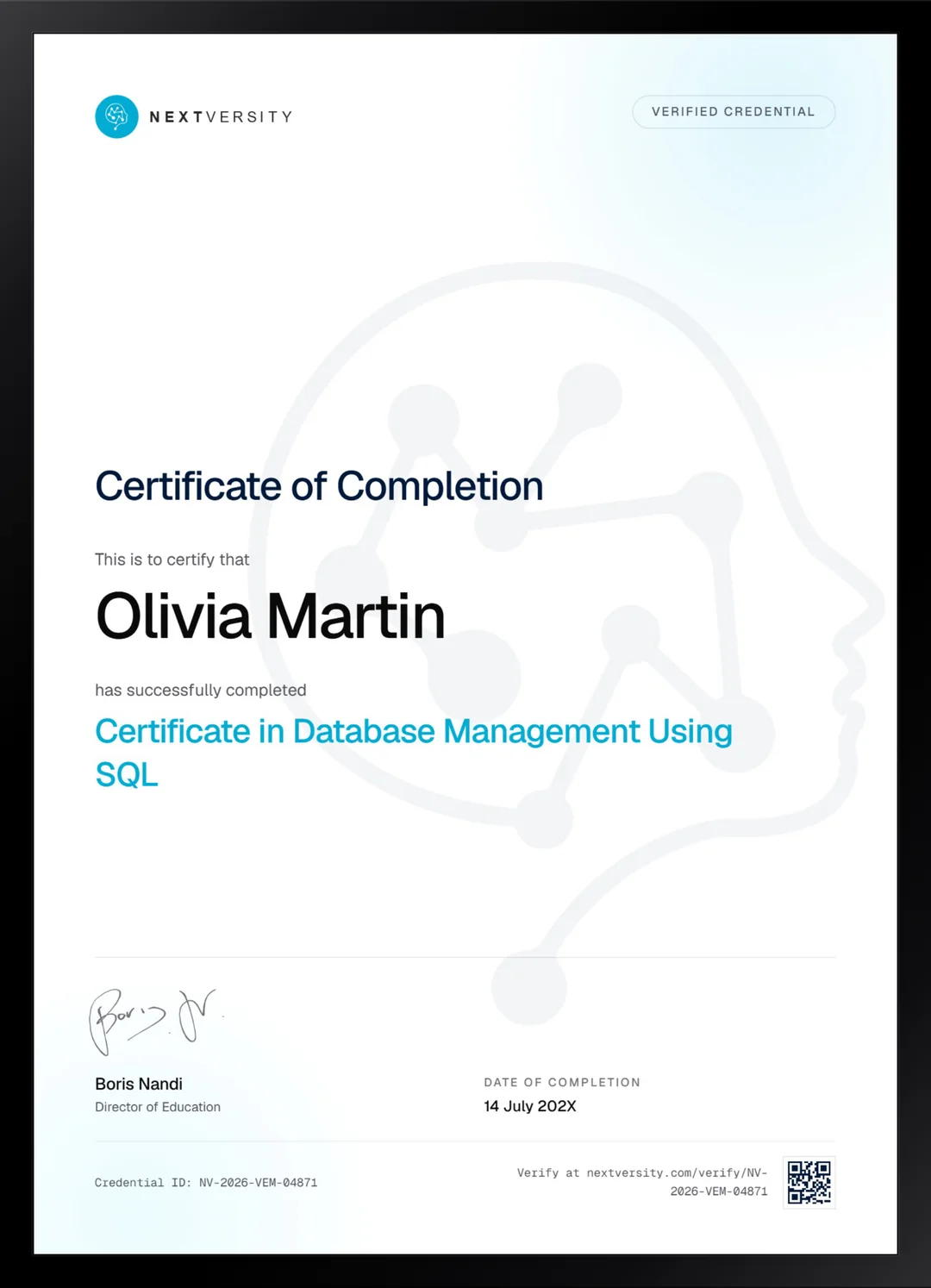
Finish the final module and your Database Management Using SQL certificate is issued automatically. Download it, share it with employers and clients, or add it to your resume and LinkedIn.
Where this can take you
Skills from this school show up in roles like these. The certificate proves you finished; the projects you build are what get you hired.
- Junior web developer
- Front-end developer
- Python developer
- Data and reporting analyst
- Automation specialist
Enroll with confidence
Enroll with confidence
Full details in the refund policy. One subscription covers this course and every other course in all 8 schools.
Pair it with
More from the Programming & Web Development school
 Advanced
Outer joins, indexes, stored procedures, transactions, triggers, views and window functions in SQL Server.
85 lessonsSelf-pacedCertificate
 Certificate
Python from a first variable to a database, with four projects including a fifteen-part banking system.
118 lessonsSelf-pacedCertificate
FAQ
Common questions about the SQL course
Is this SQL course suitable for beginners?
Yes, and it assumes no programming at all. SQL has few keywords and they read close to English, so the syntax is rarely the difficulty. Knowing which question to ask and how to shape the data to answer it is the real skill, and that is exactly what the fifty-one exercises drill into you.
How long does the SQL course take?
Around 27 hours of video, with 30 hours or more once your own practice is counted, and that second figure only counts if you actually pause and build each exercise before watching the answer. It is self-paced with no deadlines, and the exercise modules split naturally into short sessions.
Do I need SQL Server, or will MySQL work?
The course is taught in Microsoft SQL Server and following along in the same tool is the smoothest path. MySQL, PostgreSQL and SQLite share nearly all of the same language, so the concepts transfer completely. A handful of statements do not, and TOP is the first: other engines use LIMIT instead.
Can I do this SQL course on a Mac?
Yes, with a little more setup. SQL Server Management Studio is Windows only, so on macOS or Linux you run SQL Server in a container and connect with a cross-platform client. That is a one-time job at the start. Everything after the connection works is identical to what you see on screen.
Is a SQL certification worth having?
It is worth roughly what the queries behind it are worth. A certificate says you finished. The eight-table database you designed and the 51 exercises you actually solved are what let you answer a technical question in an interview. You get both here, and the certificate carries a verification code anyone can check.
What is the difference between this and the advanced SQL course?
This one gets you writing queries at all. The advanced certificate makes you genuinely useful with them: outer joins, indexes and execution plans, stored procedures, cursors, transactions, triggers, views and window functions. Take them in order. The advanced course opens the editor in lesson one and never slows down for anyone who arrived unprepared.
Will SQL help me if I already do reporting in Excel?
Probably more than you expect. A spreadsheet holds one copy of the data while a database holds relationships between tables, so a question that would take a morning of lookups and pivots becomes a query you write once and rerun forever. It is the single most common next step for anyone who has outgrown spreadsheets.
Free info pack
Not ready to enroll? Start with the guide.
The full curriculum for this course, what you'll build, and how it fits with the rest of the school, in one short guide.