Graphic Design & Illustration school
Certificate in UX/UI Design Using Figma
From what UX actually means to a file a developer can build.
This Figma course teaches user experience as a discipline and Figma as the tool, ending in six complete case study builds you can put straight into a portfolio.
Overview
What this Figma course covers
This Figma course teaches user experience as a discipline and Figma as the tool that expresses it, in that order, because a beautiful screen solving the wrong problem is still the wrong screen. You start on theory, then wireframe at low and mid fidelity before choosing a single color, then move through prototyping, components, developer handoff and research.
The professional half is auto layout, so screens resize instead of falling apart, and design systems with styles, scalable components and documentation. It ends in six complete flows, from a responsive landing page to an iOS banking payment. Finish those and you have a portfolio, which is the only thing a hiring manager ever asks a UX designer to show.
Outcomes
What you will be able to do
Requirements
Course requirements
- A computer and a web browser. Figma runs in the browser, so there is nothing to install.
- A free Figma account. The setup module walks you through creating one.
- No design experience. The opening modules assume you have never opened a design tool.
- One product idea of your own to carry through the course, ideally solving a problem you have watched a real person have.
Syllabus
UX/UI Design Using Figma curriculum
114 recorded video lessons you follow along in the software, at your own pace. Quizzes through each module check what stuck, and a 20-question final exam earns your certificate.
1UX/UI Design Foundations4 lessons · 3 videos · 2 quizzes
- Welcome (reading)
- Introduction to UX and UI Design (video lesson, 27 minutes 5 seconds)Quiz
- Understanding Design Thinking and User Needs (video lesson, 17 minutes 17 seconds)
- Core UX/UI Design Principles (video lesson, 10 minutes 5 seconds)Quiz
2Figma Setup and Wireframing Fundamentals7 lessons · 7 videos · 2 quizzes
- Setting Up Your Figma Account (video lesson, 11 minutes 21 seconds)
- Introduction to Figma for Design and Prototyping (video lesson, 13 minutes 4 seconds)Quiz
- Working with Layers, Groups and Frames (video lesson, 12 minutes 35 seconds)
- Using Basic Figma Tools (video lesson, 19 minutes 33 seconds)
- Understanding Figma Design Properties (video lesson, 27 minutes 33 seconds)
- Creating User Scenarios and User Stories (video lesson, 12 minutes 21 seconds)
- Creating Mid-Fidelity Wireframes (video lesson, 21 minutes 8 seconds)Quiz
3Visual Design and Prototyping in Figma11 lessons · 11 videos · 3 quizzes
- Applying Color Theory in UI Design (video lesson, 7 minutes 42 seconds)
- Creating a UI Moodboard (video lesson, 20 minutes 10 seconds)
- Typography Fundamentals for UI Design (video lesson, 9 minutes 55 seconds)
- Using Auto Layout for Smart Design (video lesson, 9 minutes 52 seconds)
- Working with Components (video lesson, 6 minutes 42 seconds)
- Using UI Kits (video lesson, 8 minutes 22 seconds)
- Working with Guides (video lesson, 7 minutes 41 seconds)
- Using the Pen and Brush Tools (video lesson, 12 minutes 4 seconds)
- Creating Navigation Interactions (video lesson, 10 minutes 1 second)Quiz
- Setting Up User Flows (video lesson, 5 minutes 35 seconds)Quiz
- Creating High-Fidelity Prototypes (video lesson, 46 minutes 52 seconds)Quiz
4Collaboration and Design Handoff3 lessons · 3 videos · 2 quizzes
- Using Chat and Spotlight for Active Collaboration (video lesson, 4 minutes 7 seconds)Quiz
- Using Comments and Annotations (video lesson, 14 minutes)
- Preparing Design Files for Handoff (video lesson, 25 minutes 6 seconds)Quiz
5UX/UI Prototype Demonstrations5 lessons · 5 videos · 2 quizzes
- Building an App Prototype Case Study (video lesson, 45 minutes 3 seconds)
- Building a Startup Website Prototype (video lesson, 47 minutes 30 seconds)
- Website Prototype Scenario 1 (video lesson, 67 minutes 2 seconds)Quiz
- Website Prototype Scenario 2 (video lesson, 26 minutes 22 seconds)
- Building a Streaming Platform Prototype (video lesson, 33 minutes 38 seconds)Quiz
6Advanced UX/UI Theory and Design Analysis5 lessons · 5 videos · 2 quizzes
- Color Theory for UX/UI Design (video lesson, 39 minutes 48 seconds)
- Comparing User Interface Designs (video lesson, 57 minutes)Quiz
- Content Creation for Digital Interfaces (video lesson, 52 minutes 44 seconds)
- Professional UI Design Discussion Part 1 (video lesson, 30 minutes 49 seconds)
- Professional UI Design Discussion Part 2 (video lesson, 41 minutes 58 seconds)Quiz
7Advanced Figma Practice and UI Components17 lessons · 17 videos · 4 quizzes
- Creating 3D Buttons and Gradient Graph Effects (video lesson, 49 minutes 49 seconds)
- Creating Horizontal, Vertical and Bi-Directional Scrolling (video lesson, 7 minutes 20 seconds)Quiz
- Applying Layer Styling Techniques (video lesson, 11 minutes 46 seconds)
- Creating Advanced Components and Variants (video lesson, 28 minutes 20 seconds)
- Designing UI Buttons (video lesson, 32 minutes 6 seconds)
- Designing UI Forms (video lesson, 21 minutes 23 seconds)
- Creating Component Animations (video lesson, 21 minutes 39 seconds)
- Designing Overlays and Pop-Ups (video lesson, 6 minutes 42 seconds)Quiz
- Designing Menus (video lesson, 10 minutes 11 seconds)
- Designing Dropdown Components (video lesson, 7 minutes 9 seconds)
- Designing Hamburger Menus (video lesson, 8 minutes 34 seconds)
- Designing an Interactive Calendar (video lesson, 24 minutes 30 seconds)
- Creating Responsive Designs (video lesson, 29 minutes 48 seconds)
- Designing Hero Section Sliders (video lesson, 22 minutes 9 seconds)Quiz
- Using AI for Image Generation and Editing (video lesson, 20 minutes 14 seconds)
- Using AI for Writing and Editing (video lesson, 7 minutes 24 seconds)
- Using AI for Drafting and Wireframing (video lesson, 14 minutes 44 seconds)Quiz
8Bonus UX Research and User Experience Principles7 lessons · 7 videos · 3 quizzes
- Introduction to UX Bonus Content (video lesson, 3 minutes 3 seconds)
- Overview of User Experience Design (video lesson, 41 minutes 4 seconds)
- Understanding the 7 Key Factors of User Experience (video lesson, 36 minutes 17 seconds)Quiz
- Understanding the Empathy Gap (video lesson, 32 minutes 52 seconds)
- Introduction to UX Research (video lesson, 7 minutes 1 second)Quiz
- Conducting User Surveys (video lesson, 12 minutes 29 seconds)
- Conducting User Interviews (video lesson, 12 minutes 22 seconds)Quiz
9Advanced Figma Course Orientation4 lessons · 4 videos · 2 quizzes
- Introduction to Advanced Figma (video lesson, 41 seconds)
- Advanced Course Welcome (video lesson, 2 minutes 41 seconds)Quiz
- Advanced Figma Course Roadmap (video lesson, 13 minutes 55 seconds)
- Foundational Figma Course Recap (video lesson, 8 minutes 14 seconds)Quiz
10Advanced Figma Workflow and Best Practice2 lessons · 2 videos · quiz
- Think, Setup, Design and Iterate (video lesson, 10 minutes 34 seconds)
- Figma Workflow Best Practices (video lesson, 18 minutes 31 seconds)Quiz
11Mastering Auto Layout in Figma7 lessons · 7 videos · 2 quizzes
- Auto Layout Fundamentals (video lesson, 14 minutes 54 seconds)
- Auto Layout Properties and Functionality Part 1 (video lesson, 14 minutes 27 seconds)
- Auto Layout Properties and Functionality Part 2 (video lesson, 17 minutes 36 seconds)Quiz
- Auto Layout Properties and Functionality Part 3 (video lesson, 15 minutes 40 seconds)
- Auto Layout Properties and Functionality Part 4 (video lesson, 11 minutes 17 seconds)
- Auto Layout Summary Part 1 (video lesson, 27 minutes 22 seconds)
- Auto Layout Summary Part 2 (video lesson, 30 minutes 51 seconds)Quiz
12Design Systems and Scalable Figma Workflows11 lessons · 11 videos · 3 quizzes
- Working with Styles Part 1 (video lesson, 25 minutes 42 seconds)
- Working with Styles Part 2 (video lesson, 12 minutes 57 seconds)Quiz
- Building Scalable Designs with Components Part 1 (video lesson, 14 minutes 31 seconds)
- Building Scalable Designs with Components Part 2 (video lesson, 8 minutes 17 seconds)
- Building Scalable Designs with Components Part 3 (video lesson, 21 minutes 33 seconds)
- Building Scalable Designs with Components Part 4 (video lesson, 35 minutes 15 seconds)
- Advanced Prototyping Part 1 (video lesson, 39 minutes 9 seconds)
- Advanced Prototyping Part 2 (video lesson, 7 minutes 4 seconds)
- Working with External Libraries (video lesson, 12 minutes 6 seconds)Quiz
- Documenting Design Systems (video lesson, 8 minutes 43 seconds)
- Design Systems Mastery Summary (video lesson, 10 minutes 15 seconds)Quiz
13Advanced Figma Course Summary1 lesson · 1 video
- Recommended Resources and Key Concept Summary (video lesson, 10 minutes 38 seconds)
14Applied UX/UI Design Case Studies30 lessons · 30 videos · 7 quizzes
- Responsive Landing Page Design Part 1 (video lesson, 22 minutes 53 seconds)
- Responsive Landing Page Design Part 2 (video lesson, 27 minutes 29 seconds)Quiz
- Responsive Landing Page Design Part 3 (video lesson, 32 minutes 39 seconds)
- Responsive Landing Page Design Part 4 (video lesson, 25 minutes 52 seconds)
- Responsive Landing Page Design Part 5 (video lesson, 29 minutes 36 seconds)
- Responsive E-Commerce Registration Flow Part 1 (video lesson, 19 minutes 39 seconds)
- Responsive E-Commerce Registration Flow Part 2 (video lesson, 25 minutes 13 seconds)
- Responsive E-Commerce Registration Flow Part 3 (video lesson, 23 minutes 9 seconds)Quiz
- Responsive E-Commerce Registration Flow Part 4 (video lesson, 33 minutes 52 seconds)
- Responsive E-Commerce Registration Flow Part 5 (video lesson, 36 minutes 45 seconds)
- Crypto Exchange Dashboard Flow Part 1 (video lesson, 31 minutes 31 seconds)
- Crypto Exchange Dashboard Flow Part 2 (video lesson, 29 minutes 30 seconds)Quiz
- Crypto Exchange Dashboard Flow Part 3 (video lesson, 26 minutes 24 seconds)
- Crypto Exchange Dashboard Flow Part 4 (video lesson, 28 minutes 11 seconds)
- Crypto Exchange Dashboard Flow Part 5 (video lesson, 29 minutes 46 seconds)
- Android Translation App Flow Part 1 (video lesson, 24 minutes 50 seconds)
- Android Translation App Flow Part 2 (video lesson, 27 minutes 29 seconds)
- Android Translation App Flow Part 3 (video lesson, 23 minutes 14 seconds)
- Android Translation App Flow Part 4 (video lesson, 19 minutes 10 seconds)Quiz
- Android Translation App Flow Part 5 (video lesson, 22 minutes 13 seconds)
- iOS Banking App Payment Flow Part 1 (video lesson, 33 minutes 12 seconds)
- iOS Banking App Payment Flow Part 2 (video lesson, 32 minutes 24 seconds)Quiz
- iOS Banking App Payment Flow Part 3 (video lesson, 27 minutes 52 seconds)
- iOS Banking App Payment Flow Part 4 (video lesson, 28 minutes 5 seconds)
- iOS Banking App Payment Flow Part 5 (video lesson, 30 minutes 49 seconds)
- iOS Car Rental App Booking Flow Part 1 (video lesson, 28 minutes 14 seconds)
- iOS Car Rental App Booking Flow Part 2 (video lesson, 27 minutes 15 seconds)Quiz
- iOS Car Rental App Booking Flow Part 3 (video lesson, 18 minutes 53 seconds)
- iOS Car Rental App Booking Flow Part 4 (video lesson, 26 minutes 24 seconds)
- iOS Car Rental App Booking Flow Part 5 (video lesson, 19 minutes 31 seconds)Quiz
15Course Conclusion and Next Steps1 lesson · 1 video
- Recommended Next Steps (video lesson, 6 minutes 10 seconds)
Certificate
Earn a certificate you can show
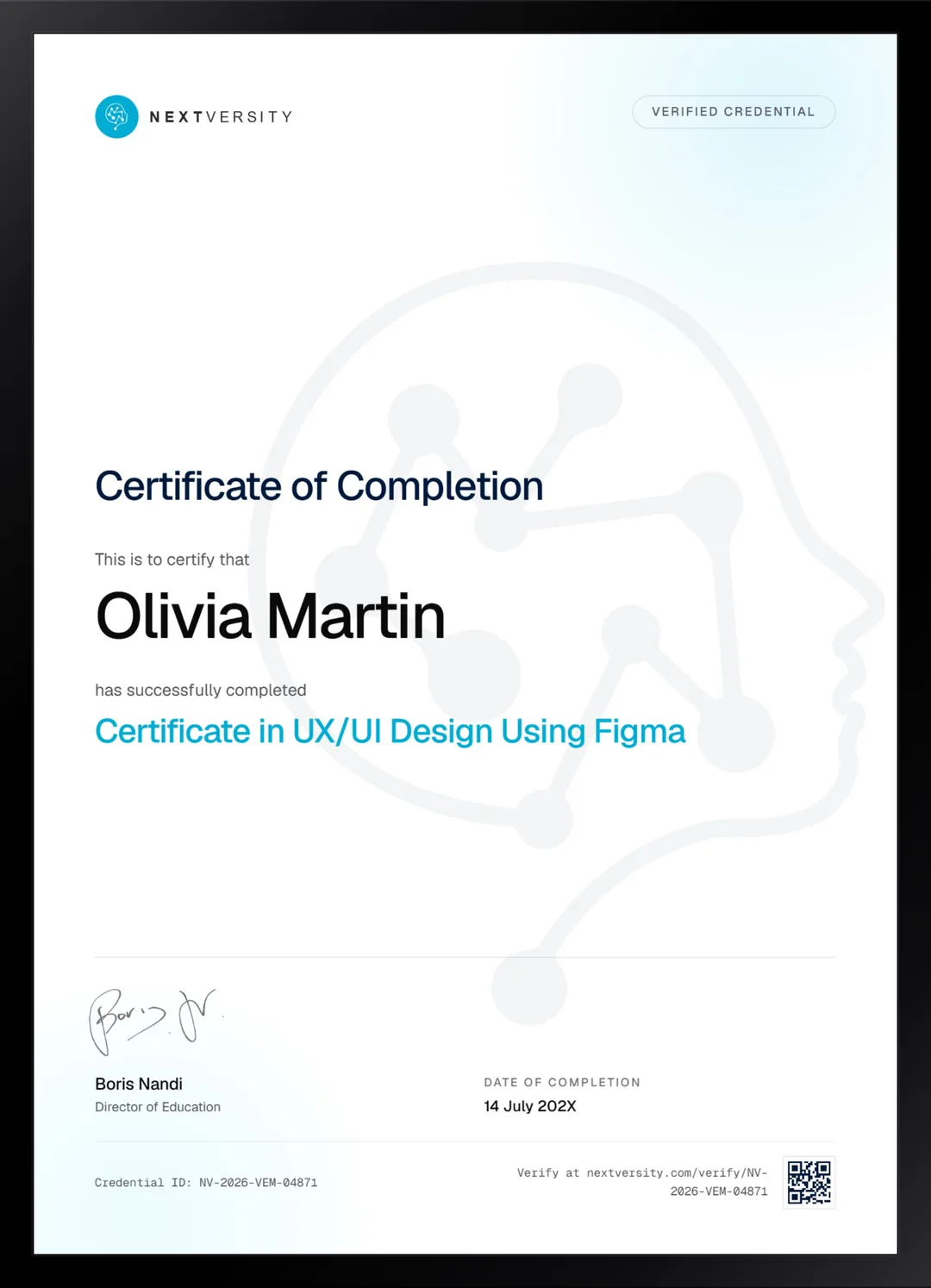
Finish the final module and your UX/UI Design Using Figma certificate is issued automatically. Download it, share it with employers and clients, or add it to your resume and LinkedIn.
Where this can take you
Skills from this school show up in roles like these. The certificate proves you finished; the projects you build are what get you hired.
- Graphic designer
- Brand and identity designer
- Social media designer
- Illustrator
- Freelance design contractor
Enroll with confidence
Enroll with confidence
Full details in the refund policy. One subscription covers this course and every other course in all 8 schools.
Pair it with
More from the Graphic Design & Illustration school
 Certificate
The full interface design process in a short course. Adobe has discontinued XD, so learn Figma for the tool.
42 lessonsSelf-pacedCertificate
 Certificate
Design principles taught once, then applied to social, print, documents, video and product mockups.
160 lessonsSelf-pacedCertificate
FAQ
Common questions about the Figma course
Is this Figma course good for beginners?
Yes. The first module is theory and does not open Figma at all, then the setup module creates your account and walks the interface one panel at a time. No design background is assumed anywhere. Never having opened a design tool is the expected starting point rather than a disadvantage you have to make up for.
Is Figma free to use for this course?
There is a free tier and it covers what the course needs. Figma changes what each plan includes from time to time, so check their site for current details rather than trusting a number written on a course page. Nothing in these lessons requires a paid plan to follow along or to finish the case studies.
Do I need to know how to code to learn UX and UI design?
No, and this course never asks you to write a line. It ends at developer handoff: preparing the file, annotating it, and passing it to the people who build it. That boundary is worth knowing before you start, because it is exactly where the job sits in most product teams and exactly what you will be hired to do.
Does the course cover UX research and design systems?
Both, properly. Research gets a module covering the key factors of user experience, the empathy gap, surveys and interviews. Design systems get eleven lessons on styles, scalable components, advanced prototyping, external libraries and documentation. Those two topics are what most short Figma tutorials skip and what product teams actually run on day to day.
How long does the Figma course take to complete?
Budget around forty hours if you build alongside the videos rather than watching them, and treat that as an estimate. The case study module alone is a serious chunk of it, because six complete flows in five parts each is real work. It is self-paced with no deadlines, so a module a week is a comfortable rhythm.
Will I get a UX design certification from this course?
You get a Nextversity certificate with a verification code and a public link, issued once you finish every lesson and pass the final exam. It is not an industry accreditation, and honestly no UX course offers one, because the field does not have a licensing body. What gets people hired in UX is the portfolio, which is why this course ends in six builds.
Should I learn Figma or Adobe XD?
Figma, for almost everyone. Adobe stopped active development of XD, and teams are not hiring for a product that stopped shipping. The XD certificate in this school is still worth taking for the design process it teaches, which transfers to any tool, but if you are choosing one to learn now, Figma is the answer and it is not close.
Free info pack
Not ready to enroll? Start with the guide.
The full curriculum for this course, what you'll build, and how it fits with the rest of the school, in one short guide.