
3D Design & Animation school
Certificate in Rhino 3D Modeling
Precision modeling for parts, products and buildings that fit.
A Rhino 3D course that teaches NURBS modeling the way Rhino is genuinely driven, by typing command names, from your first curve to a printed drawing set.
Overview
What this Rhino 3D course covers
Rhino is the precision surface modeler used by engineers, architects and jewelry, product and interior designers. This Rhino 3D course teaches it the way it is genuinely driven: type a command name, then read what the command line asks for next. The real difficulty is knowing the thing you want is called FilletEdge, so every lesson writes its key moves down where you can find them again.
You start on the four kinds of geometry and the accuracy tools that are the whole reason to use Rhino, then build surfaces and solids with loft, sweep, revolve and patch. Half the job nobody advertises comes next: editing a model somebody else drew. It ends where engineering work has to end, with plans and sections pulled by Make2D, dimensions, and layout sheets at a stated scale ready to print.
Outcomes
What you will be able to do
Requirements
Course requirements
- Rhino, installed. It is separate software you buy yourself, and the subscription covers the course rather than the program.
- No CAD experience. The course starts at what a command prompt is and builds from there.
- A three-button mouse with a scroll wheel. Rhino navigation depends on it and there is no comfortable substitute.
- Somewhere to save files. Almost every lesson from the toolbars module onward produces something worth keeping.
Syllabus
Rhino 3D Modeling curriculum
55 recorded video lessons you follow along in the software, at your own pace. Quizzes through each module check what stuck, and a 20-question final exam earns your certificate.
1Course Orientation and Rhino Overview2 lessons · 1 video · quiz
- Welcome (reading)
- Introduction to Rhino 3D (video lesson, 6 minutes 28 seconds)Quiz
2Rhino Viewports and Display Settings2 lessons · 2 videos · quiz
- Understanding Viewports (video lesson, 7 minutes 22 seconds)
- Working with Viewports and Views (video lesson, 13 minutes 1 second)Quiz
3Rhino Navigation Fundamentals2 lessons · 2 videos · quiz
- Navigating the 3D Model (video lesson, 5 minutes 24 seconds)
- Navigating Objects within a Model (video lesson, 6 minutes 27 seconds)Quiz
4Rhino Toolbars and Core Modeling Tools10 lessons · 10 videos · quiz
- Drawing Lines and Curves (video lesson, 47 minutes)
- Exercise: Creating Jacky the Lady (video lesson, 37 minutes 11 seconds)
- Creating Surfaces (video lesson, 18 minutes 21 seconds)
- Creating Meshes from Surfaces (video lesson, 19 minutes 46 seconds)
- Exercise: Modeling the Art Gallery (video lesson, 38 minutes 31 seconds)
- Exercise: True or False Modeling Practice (video lesson, 6 minutes 30 seconds)
- Creating Solids (video lesson, 25 minutes 9 seconds)
- Exercise: Modeling an Art Gallery in Egypt (video lesson, 16 minutes 22 seconds)
- Using the Status Bar (video lesson, 15 minutes 49 seconds)
- Working with Layers (video lesson, 21 minutes 42 seconds)Quiz
5Coordinate-Based Drawing in Rhino2 lessons · 2 videos · quiz
- Understanding Coordinates (video lesson, 11 minutes 56 seconds)
- Exercise: Drawing the Arrow (video lesson, 18 minutes 26 seconds)Quiz
6Line Drawing and Curve Editing Tools5 lessons · 5 videos · quiz
- Using Rotate, Trim and Scale (video lesson, 27 minutes 8 seconds)
- Using Join, Extend, Split and Fillet (video lesson, 13 minutes 47 seconds)
- Using Group, Mirror and Offset (video lesson, 9 minutes 46 seconds)
- Using Array and Chamfer (video lesson, 19 minutes 44 seconds)
- Using Blend and Control Point Adjustments (video lesson, 10 minutes 17 seconds)Quiz
7Surface and Solid Modeling Techniques3 lessons · 3 videos · quiz
- Using Loft, Pipe and Patch (video lesson, 15 minutes 11 seconds)
- Using Sweep and Revolve (video lesson, 17 minutes 26 seconds)
- Exercise: Creating the Map (video lesson, 32 minutes 44 seconds)Quiz
8Converting Geometry into Surfaces and Solids3 lessons · 3 videos · quiz
- Extruding Geometry into Surfaces (video lesson, 15 minutes 35 seconds)
- Extruding Geometry into Solids (video lesson, 11 minutes 11 seconds)
- Creating Text in Rhino (video lesson, 9 minutes 39 seconds)Quiz
9Dimensioning and Measurement Tools1 lesson · 1 video · quiz
- Adding Dimensions to Rhino Models (video lesson, 14 minutes 40 seconds)Quiz
10Importing Files into Rhino1 lesson · 1 video · quiz
- Inserting and Importing Files (video lesson, 6 minutes 23 seconds)Quiz
11Rhino Modeling Review Exercise1 lesson · 1 video · quiz
- Exercise: Modeling an Ice Cream Car (video lesson, 39 minutes 51 seconds)Quiz
12Construction Planes and Drawing Setup1 lesson · 1 video · quiz
- Working with Construction Planes (video lesson, 16 minutes 19 seconds)Quiz
13Model Deconstruction Tools1 lesson · 1 video · quiz
- Using Explode and Extract Tools (video lesson, 27 minutes 51 seconds)Quiz
14Model Transformation and Deformation Tools2 lessons · 2 videos · quiz
- Using Orient, Twist and Bend (video lesson, 26 minutes 24 seconds)
- Using Taper, Stretch and Flow Along (video lesson, 7 minutes 56 seconds)Quiz
15Advanced Model Editing and Modification7 lessons · 7 videos · quiz
- Using Trim, Union, Difference and Intersection (video lesson, 27 minutes 9 seconds)
- Adjusting Surfaces (video lesson, 19 minutes 1 second)
- Using Rhino Shortcuts (video lesson, 3 minutes 43 seconds)
- Using Cap and Shell Tools (video lesson, 6 minutes 41 seconds)
- Adjusting Solid Geometry (video lesson, 25 minutes 54 seconds)
- Using Cage Edit (video lesson, 13 minutes 52 seconds)
- Editing with Control Points (video lesson, 5 minutes 59 seconds)Quiz
16Object Organization and Documentation Tools1 lesson · 1 video · quiz
- Using Blocks and Hatches (video lesson, 22 minutes 28 seconds)Quiz
17Mesh Modeling and Editing3 lessons · 3 videos · quiz
- Working with Meshes (video lesson, 6 minutes 24 seconds)
- Adjusting Mesh Geometry Part 1 (video lesson, 18 minutes 48 seconds)
- Adjusting Mesh Geometry Part 2 (video lesson, 12 minutes 4 seconds)Quiz
18Converting 3D Models into 2D Drawings2 lessons · 2 videos · quiz
- Using Clipping Planes (video lesson, 21 minutes 49 seconds)
- Creating 2D Drawings from 3D Models (video lesson, 21 minutes 34 seconds)Quiz
19Materials, Environments and Model Presentation2 lessons · 2 videos · quiz
- Applying Materials, Textures and Environments (video lesson, 40 minutes 18 seconds)
- Creating Model Animations (video lesson, 4 minutes 42 seconds)Quiz
20Layout, Print and Export Workflow2 lessons · 2 videos · quiz
- Preparing Layouts and Prints (video lesson, 14 minutes 3 seconds)
- Exporting Rhino Files (video lesson, 2 minutes 50 seconds)Quiz
21Grasshopper Introduction1 lesson · 1 video · quiz
- Introduction to Grasshopper (video lesson, 21 minutes 33 seconds)Quiz
22Applied Rhino Modeling Projects2 lessons · 2 videos
- Exercise: Adjusting an Apartment Interior (video lesson, 88 minutes 56 seconds)
- Exercise: Modeling a Building Construction (video lesson, 117 minutes 36 seconds)
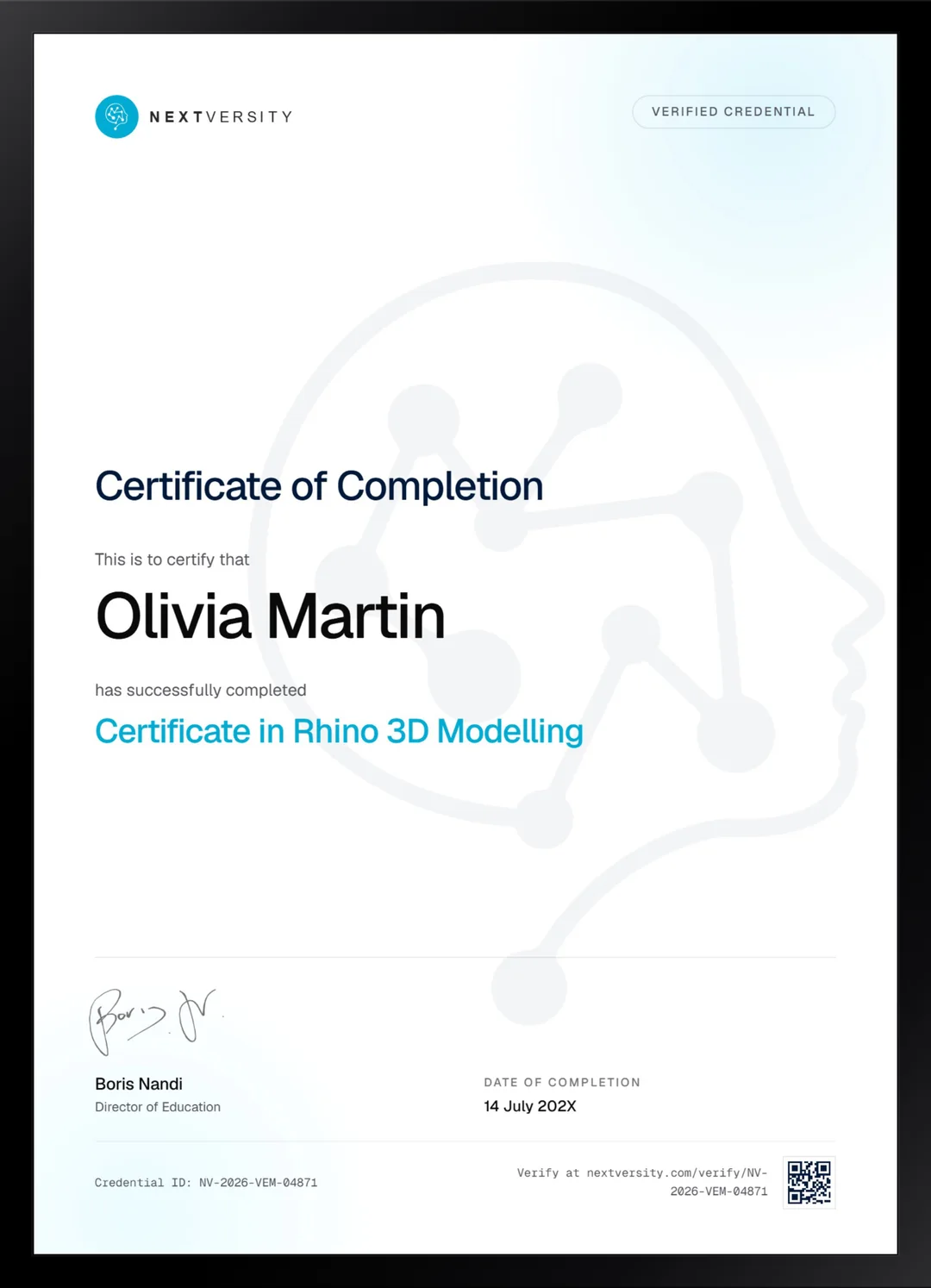
Certificate
Earn a certificate you can show
Finish the final module and your Rhino 3D Modeling certificate is issued automatically. Download it, share it with employers and clients, or add it to your resume and LinkedIn.
Where this can take you
Skills from this school show up in roles like these. The certificate proves you finished; the projects you build are what get you hired.
- 3D modeler
- 3D generalist
- Environment artist
- Product visualization artist
Enroll with confidence
Enroll with confidence
Full details in the refund policy. One subscription covers this course and every other course in all 8 schools.
Pair it with
More from the 3D Design & Animation school
 Certificate
Start at the download page and finish with an object modeled, sculpted, unwrapped, textured, lit and rendered.
77 lessonsSelf-pacedCertificate
 Certificate
Plan, block out, model, unwrap, texture, scatter and light two complete Blender scenes, start to finish.
132 lessonsSelf-pacedCertificate
FAQ
Common questions about the Rhino 3D course
Should I learn Rhino or Blender?
It depends entirely on what you are drawing. Rhino is a NURBS surface modeler and it wins whenever dimensions matter: a product enclosure, a building, a piece of jewelry, anything that has to be manufactured. Blender wins for organic shape, characters, scenes and rendering. They are different trades rather than competitors, and both courses are in this subscription.
Do I need CAD experience to start this Rhino course?
No. It starts at what a command prompt is, then covers the four kinds of geometry every Rhino model is built from, the viewports and the mouse. If you already model in another NURBS package, treat the early modules as a vocabulary lesson and move quickly. If you have never done this, the pace is set for you.
Is Rhino included in the Nextversity subscription?
No. Rhino is separate software you install and license yourself, and the subscription covers this course rather than the program. The course does not quote a price or name a plan, because those change. Check Rhino for current pricing before you start, since this is the one course here where the software is a real cost.
Which version of Rhino does the course use?
It is recorded in Rhino 6, and the lessons note that it is very similar to Rhino 5 and that the settings apply to Rhino 7 as well. Command names are the stable part of Rhino and they have barely moved in years, which is exactly why this course teaches by command name rather than by menu position.
Can I produce technical drawings and layouts from Rhino?
Yes, and that stretch is a genuine part of the course rather than an afterthought. Clipping planes, plans, sections and elevations pulled with Make2D, dimensions and annotation, layout sheets set at a stated scale, then print and export. For engineering and architecture work this is the part that makes the model useful to anyone else.
Does the Rhino course cover Grasshopper?
As an introduction rather than as a subject. One module opens the door on what Grasshopper is and how a parametric definition connects up, which is enough to decide whether you want to pursue it. Treat it as a signpost. Grasshopper is a large discipline of its own and no single module could do it justice.
How long does this Rhino course take to work through?
Roughly 50 to 60 hours if you build along, which is the only way the command names stick. That is time in Rhino rather than time watching, and the two long applied projects at the end account for a good share of it. It is self-paced with no deadlines, so a module a week works well.
Free info pack
Not ready to enroll? Start with the guide.
The full curriculum for this course, what you'll build, and how it fits with the rest of the school, in one short guide.