Game Design & Development school
Certificate in 2D Game Development Using Godot
One role-playing game, assembled system by system.
This Godot 2D course is one long project rather than a shelf of demos: a role-playing game in GDScript with towns, shops, inventory, quests, combat, a dungeon and save files.
Overview
What this Godot 2D course covers
Isolated tutorials teach you features. This Godot 2D course teaches how features fit together, which is the harder and far more valuable skill, and it does that by keeping you inside a single role-playing game from the first lesson to the exported build.
Town comes first, with NPCs and dialogue, a shop, inventory and equipment, side quests and banking, then combat, a first-person dungeon and treasure. The architecture arrives when the game needs it rather than in a tidy order, so a command pattern, a message bus and autoloads each show up at the point the project starts hurting without them. Finishing leaves you able to structure a project that survives its own size, which separates people who ship from people who restart.
Outcomes
What you will be able to do
Requirements
Course requirements
- Godot 4.x, and the version genuinely matters. Godot 3 code will not run here.
- Some programming experience. GDScript is covered from variables onward and moves quickly, so loops and functions should not be new.
- Version control such as Git. The lessons skip it, and it is the one decision here worth reversing.
- No art skills. The sprites are placeholders and nothing in the course teaches drawing.
Syllabus
2D Game Development Using Godot curriculum
113 recorded video lessons you follow along in the software, at your own pace. Quizzes through each module check what stuck, and a 20-question final exam earns your certificate.
1Godot Setup and Project Foundations5 lessons · 4 videos · 2 quizzes
- Introduction (reading)
- Course Overview and Learning Expectations (video lesson, 30 seconds)
- Installing Godot (video lesson, 1 minute 31 seconds)Quiz
- Creating a New Godot Project (video lesson, 2 minutes 31 seconds)
- Configuring Project Resolution and Scaling (video lesson, 2 minutes 38 seconds)Quiz
2Godot Scripting and Interface Foundations9 lessons · 9 videos · 2 quizzes
- Creating a Game Title Screen (video lesson, 29 minutes)
- Creating a Base UI Theme (video lesson, 13 minutes 14 seconds)
- Displaying the Game Version Number (video lesson, 9 minutes 25 seconds)
- Basic Godot Scripting, Variables and Operators (video lesson, 4 minutes 45 seconds)
- Using Conditional Logic (video lesson, 2 minutes 3 seconds)Quiz
- Using Iteration and Collections (video lesson, 3 minutes 55 seconds)
- Creating and Using Functions (video lesson, 2 minutes 40 seconds)
- Understanding Objects and Inheritance (video lesson, 4 minutes 57 seconds)
- Using the Godot Debugger (video lesson, 2 minutes 32 seconds)Quiz
3Asynchronous Loading Screen Development2 lessons · 2 videos · quiz
- Creating an Asynchronous Loading Screen UI (video lesson, 9 minutes 38 seconds)
- Coding an Asynchronous Loading Scene (video lesson, 22 minutes 57 seconds)Quiz
4Main Game Scene and World Map Setup6 lessons · 6 videos · 3 quizzes
- Starting a New Game Session (video lesson, 3 minutes 29 seconds)Quiz
- Organizing the Main Game Scene (video lesson, 4 minutes 14 seconds)
- Creating a World Map Tileset (video lesson, 5 minutes 39 seconds)
- Creating the World Map Tilemap (video lesson, 9 minutes 45 seconds)Quiz
- Adding Terrain Data to the World Map (video lesson, 5 minutes 20 seconds)
- Creating Base Scripts for the World Map (video lesson, 13 minutes 35 seconds)Quiz
5Player Commands and Input Systems4 lessons · 4 videos · 2 quizzes
- Creating the Command Menu UI (video lesson, 4 minutes 36 seconds)Quiz
- Understanding the Command Pattern (video lesson, 8 minutes 16 seconds)
- Creating the Command Processor (video lesson, 18 minutes 17 seconds)
- Implementing Player Movement Commands (video lesson, 6 minutes 19 seconds)Quiz
6Message Console UI and Scripting2 lessons · 2 videos · quiz
- Creating the Message Console UI (video lesson, 8 minutes 7 seconds)
- Coding the Message Console (video lesson, 21 minutes 15 seconds)Quiz
7Message Bus Architecture1 lesson · 1 video · quiz
- Creating a Message Bus System (video lesson, 3 minutes)Quiz
8Player Avatar Creation and Movement3 lessons · 3 videos · quiz
- Creating the 2D Map Player Avatar (video lesson, 12 minutes 16 seconds)
- Spawning the Player Avatar (video lesson, 13 minutes 45 seconds)
- Implementing Player Avatar Movement (video lesson, 38 minutes 55 seconds)Quiz
9Map Entity Systems2 lessons · 2 videos · quiz
- Creating Map Entities (video lesson, 12 minutes 55 seconds)
- Creating Change Map Trigger Entities (video lesson, 6 minutes 52 seconds)Quiz
10Asynchronous Map Transition Systems1 lesson · 1 video · quiz
- Creating Asynchronous Map Loading (video lesson, 18 minutes 35 seconds)Quiz
11Town Map, NPC and Shop Foundations8 lessons · 8 videos · 2 quizzes
- Creating a Town Map with Tiles and Collision Data (video lesson, 18 minutes 48 seconds)
- Creating Roofless Shops with Tilemap Layers and Area2D Triggers (video lesson, 18 minutes 24 seconds)
- Creating Basic NPCs (video lesson, 14 minutes 8 seconds)
- Implementing the Speak Command (video lesson, 14 minutes 17 seconds)Quiz
- Adding Dynamic UI to the Message Console (video lesson, 22 minutes 40 seconds)
- Creating Shopkeeper Responses to the Speak Command (video lesson, 6 minutes 8 seconds)
- Creating Shopkeeper Inventory and Item Definitions (video lesson, 6 minutes 26 seconds)
- Triggering the Shop Interface (video lesson, 5 minutes 58 seconds)Quiz
12Shop Interface and Item Trading Systems9 lessons · 9 videos · 2 quizzes
- Creating the Shop Interface Part 1.1 (video lesson, 11 minutes 10 seconds)
- Creating the Shop Interface Part 1.2 (video lesson, 19 minutes 31 seconds)
- Creating the Shop Interface Part 2.1 (video lesson, 23 minutes 59 seconds)
- Creating the Shop Interface Part 2.2 (video lesson, 9 minutes 20 seconds)
- Creating the PlayerData Object (video lesson, 18 minutes 19 seconds)Quiz
- Cloning Items (video lesson, 4 minutes 10 seconds)
- Implementing Item Purchasing (video lesson, 7 minutes 18 seconds)
- Adding a Sell Tab to the Shop Interface Part 1 (video lesson, 13 minutes 41 seconds)
- Adding a Sell Tab to the Shop Interface Part 2 (video lesson, 32 minutes 20 seconds)Quiz
13Player Stats, Inventory and Equipment Systems5 lessons · 5 videos · 2 quizzes
- Creating the Character Info Dialog (video lesson, 28 minutes 52 seconds)
- Implementing the Equip Command (video lesson, 9 minutes 10 seconds)
- Creating the Equip Dialog (video lesson, 17 minutes 43 seconds)Quiz
- Defining Equipment Slots in PlayerData (video lesson, 7 minutes 29 seconds)
- Equipping Items (video lesson, 9 minutes 15 seconds)Quiz
14Casino Minigame Development8 lessons · 8 videos · 2 quizzes
- Creating the Casino NPC (video lesson, 6 minutes 54 seconds)
- Creating the Hi-Lo Game Scene (video lesson, 20 minutes 57 seconds)
- Creating Playing Cards (video lesson, 13 minutes 50 seconds)
- Creating the Hi-Lo Betting Interface Part 1 (video lesson, 24 minutes 53 seconds)
- Creating the Hi-Lo Betting Interface Part 2 (video lesson, 18 minutes 49 seconds)Quiz
- Creating Hi-Lo Card Dealing and Game Flow (video lesson, 30 minutes 35 seconds)
- Creating the Hi-Lo Jackpot Particle System (video lesson, 14 minutes 5 seconds)
- Connecting the Casino Scene (video lesson, 11 minutes 47 seconds)Quiz
15Side Quest and Delivery Systems5 lessons · 5 videos · 2 quizzes
- Triggering the Mail Delivery Request (video lesson, 14 minutes 35 seconds)
- Creating the Mail Item (video lesson, 13 minutes 23 seconds)
- Giving the Package to the Player (video lesson, 31 minutes 9 seconds)Quiz
- Creating a Second City Map (video lesson, 10 minutes 49 seconds)
- Implementing Mail Delivery (video lesson, 8 minutes 42 seconds)Quiz
16Banking and Interest Systems4 lessons · 4 videos · 2 quizzes
- Creating the Bank NPC (video lesson, 4 minutes 47 seconds)
- Creating the Bank UI (video lesson, 5 minutes 48 seconds)Quiz
- Creating the Deposit and Withdraw Interface (video lesson, 14 minutes 6 seconds)
- Tracking Time Passed and Calculating Interest (video lesson, 9 minutes 36 seconds)Quiz
17Healing NPC Systems1 lesson · 1 video · quiz
- Creating the Healer NPC (video lesson, 23 minutes 13 seconds)Quiz
18Food, Vendors and World Map Survival Systems3 lessons · 3 videos · quiz
- Adding Food Consumption Data to the Tileset (video lesson, 6 minutes 17 seconds)
- Creating the Food Vendor NPC and Purchase UI (video lesson, 19 minutes 8 seconds)
- Implementing Food Consumption and Extending the Game Display (video lesson, 14 minutes 19 seconds)Quiz
19World Map Encounter and Combat Systems7 lessons · 7 videos · 2 quizzes
- Creating Terrain-Based Encounter Rates (video lesson, 10 minutes 27 seconds)
- Creating Terrain-Based Encounter Tables (video lesson, 10 minutes 32 seconds)
- Creating Monster Scenes and Data (video lesson, 14 minutes 39 seconds)Quiz
- Initialising World Map Encounters (video lesson, 21 minutes 9 seconds)
- Creating Overland Combat (video lesson, 22 minutes 24 seconds)
- Handling Player Death and Rewards (video lesson, 8 minutes 2 seconds)
- Interacting with Friendly Mobs (video lesson, 6 minutes 6 seconds)Quiz
20Dungeon Scene and 3D Map Systems6 lessons · 6 videos · 2 quizzes
- Creating the Base 3D Map Scene (video lesson, 7 minutes 1 second)
- Creating a Tilemap as Internal Data (video lesson, 5 minutes 5 seconds)Quiz
- Handling Map-Specific Command Menus (video lesson, 3 minutes 47 seconds)
- Creating the 3D Dungeon Base Scene Part 1 (video lesson, 13 minutes 52 seconds)
- Creating the 3D Dungeon Base Scene Part 2 (video lesson, 14 minutes 40 seconds)
- Implementing 3D Player Movement (video lesson, 24 minutes 3 seconds)Quiz
21Dungeon Monsters and Combat Systems4 lessons · 4 videos · 2 quizzes
- Creating Dungeon Monster Tables, Scenes and Data (video lesson, 10 minutes 19 seconds)
- Creating Dungeon Monster Movement and Combat (video lesson, 30 minutes 43 seconds)
- Creating Dungeon Monster Special Attacks (video lesson, 12 minutes 48 seconds)Quiz
- Rendering Dungeon Monsters with Shaders (video lesson, 15 minutes 13 seconds)Quiz
22Treasure Chest Interaction Systems4 lessons · 4 videos · 2 quizzes
- Creating Treasure Chest Scenes, Data and Placement (video lesson, 8 minutes 52 seconds)
- Refactoring the Object Render View (video lesson, 27 minutes 11 seconds)
- Implementing the Open Command (video lesson, 6 minutes 41 seconds)Quiz
- Opening and Destroying Treasure Chests (video lesson, 6 minutes 59 seconds)Quiz
23Player Data, Flags and Ability Integration3 lessons · 3 videos · 2 quizzes
- Creating Event Flags (video lesson, 12 minutes 3 seconds)Quiz
- Using Equipped Items in Gameplay (video lesson, 27 minutes 6 seconds)
- Integrating Ability Scores and Items into Game Mechanics (video lesson, 24 minutes 34 seconds)Quiz
24Save and Load Game Systems4 lessons · 4 videos · 2 quizzes
- Creating the Load and Save Screen (video lesson, 14 minutes 43 seconds)
- Saving the Game Part 1 (video lesson, 29 minutes 10 seconds)
- Saving the Game Part 2 (video lesson, 17 minutes 36 seconds)Quiz
- Loading Saved Games (video lesson, 30 minutes 41 seconds)Quiz
25Conditional Event Systems1 lesson · 1 video · quiz
- Creating Conditional Triggers (video lesson, 15 minutes 8 seconds)Quiz
26Quest Object and Quest NPC Systems2 lessons · 2 videos · 2 quizzes
- Creating Quest Object Triggers (video lesson, 5 minutes 27 seconds)Quiz
- Creating Quest NPCs (video lesson, 18 minutes 40 seconds)Quiz
27Endgame Cinematic Development1 lesson · 1 video · quiz
- Creating a Scrolling End Cinematic (video lesson, 10 minutes 6 seconds)Quiz
28Audio and Music Implementation1 lesson · 1 video · quiz
- Using the Audio Bus and AudioStreamPlayer Node (video lesson, 10 minutes 1 second)Quiz
29Game Export and Delivery1 lesson · 1 video · quiz
- Installing Export Templates and Exporting Your Game (video lesson, 4 minutes 52 seconds)Quiz
30TileMapLayer Workflow Appendix1 lesson · 1 video · quiz
- Using the TileMapLayer Node (video lesson, 5 minutes 53 seconds)Quiz
31Vector Math and Coordinate Systems Appendix1 lesson · 1 video
- Understanding Vectors, Vector Math and Cartesian Coordinates (video lesson, 3 minutes 57 seconds)
Certificate
Earn a certificate you can show
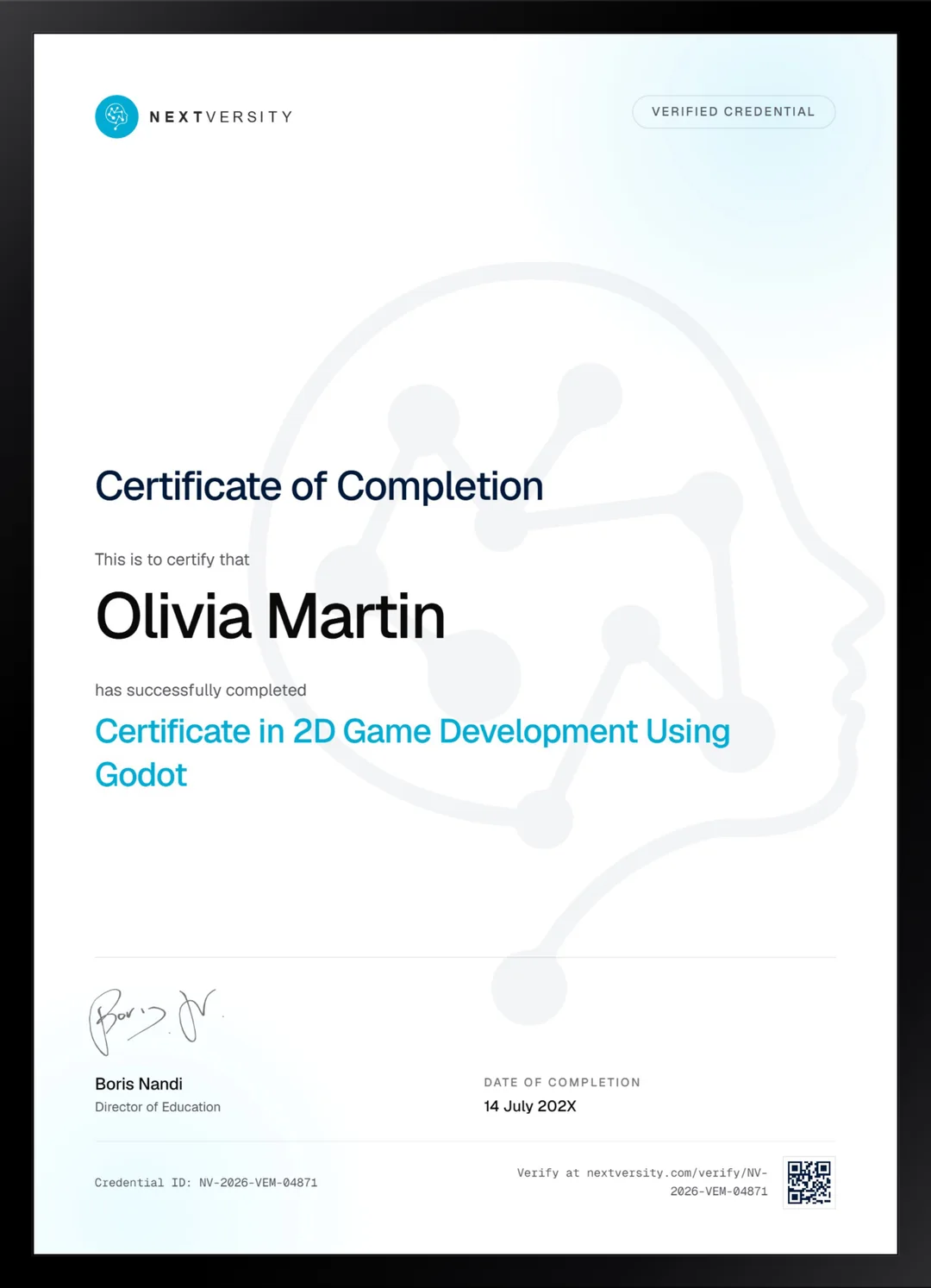
Finish the final module and your 2D Game Development Using Godot certificate is issued automatically. Download it, share it with employers and clients, or add it to your resume and LinkedIn.
Where this can take you
Skills from this school show up in roles like these. The certificate proves you finished; the projects you build are what get you hired.
- Junior game developer
- Gameplay programmer
- Level designer
- Indie game developer
- QA and games tester
Enroll with confidence
Enroll with confidence
Full details in the refund policy. One subscription covers this course and every other course in all 8 schools.
Pair it with
More from the Game Design & Development school
 Certificate
Build an arena tank battle in Godot: vectors, physics, enemy state machines, a minimap and menus.
39 lessonsSelf-pacedCertificate
 Certificate
C# from zero, then five Unity projects, with a 2D platformer carrying most of the engine work.
64 lessonsSelf-pacedCertificate
FAQ
Common questions about the Godot 2D course
Do I need to know how to code before taking a Godot course?
For this one, yes, at least a little. GDScript is covered from variables onward but it moves quickly, and the pace assumes you have met loops and functions before. If you have never written code at all, start with the Unity 2D certificate in this school, which teaches C# from zero, then come back.
Is Godot free, and is there a catch?
It is free and open source, with no license fee, no revenue share and no seat cost. The download is a single small file. There is genuinely no catch, which is why Godot has grown so fast among indie developers. Everything you build in this course is yours to publish without paying anybody.
Which version of Godot does this course use?
Godot 4.x, and the version genuinely matters here. Godot 3 code will not run, because the node names, the signal syntax and the physics API all changed. One further note worth reading early: the TileMap node was deprecated partway through recording, so on 4.3 or later read the TileMapLayer appendix before the map modules.
What do I build in this Godot 2D course?
One role-playing game, and only that. It carries a world map, towns, shops, NPCs, an inventory, quests, a casino minigame, banking with interest, combat, a first-person dungeon, treasure, save files, an end cinematic and an export. Building one large thing teaches you far more about structure than five small ones ever could.
Should I take the 2D or the 3D Godot course?
Take this one to learn how a whole game is assembled and how its systems talk to each other. Take the 3D course if you want 3D specifically, or if you want something shorter. The 3D course also assumes less programming, so it is the gentler entry point of the two. Both are in this subscription.
Do I need to be able to draw or make art?
No, and the course is blunt about it. The sprites are placeholders, several NPCs are the same sprite in different colors, and nothing here teaches art. That is a deliberate trade: every minute goes on systems and structure instead. If you want to make your own assets, the Pixel Art certificate covers exactly that.
Will I finish this course in a weekend?
No, and it is worth knowing up front. This is the longest course in the school and it is built to be typed along with rather than watched. The payoff is proportional: you finish with a complete, exported, playable game and a real understanding of how large projects hold together as they grow.
Free info pack
Not ready to enroll? Start with the guide.
The full curriculum for this course, what you'll build, and how it fits with the rest of the school, in one short guide.