AI & Automation school
Certificate in AI Design Using Adobe Firefly
Generative AI inside Photoshop and Illustrator, not beside them.
This Adobe Firefly course covers generative fill, style and composition references and text effects, then leaves Firefly for mockups in Photoshop, vectors in Illustrator, social sets in Express and video.
Overview
What this Adobe Firefly course covers
The reason to learn this tool rather than a standalone generator is integration: this Adobe Firefly course spends half its length inside Photoshop, Illustrator and Express rather than in a browser tab beside them. If your work already lives in Adobe applications, that is a genuinely different proposition.
Nine lessons need nothing but a Firefly account, covering style and composition references as the separate controls they are, generative fill, expanding a canvas and text effects. Then it leaves: a product mockup finished in Photoshop with shadows and a displacement map, generated logo concepts turned into clean vectors in Illustrator, branded social sets animated in Express, and a final module on video end to end. Four lessons are class projects, and they are the point.
Outcomes
What you will be able to do
Requirements
Course requirements
- A Firefly account, plus Photoshop for the mockup module and Illustrator for the vector module. Adobe offers free trials.
- Credits, and two kinds. Generating spends credits, and video features spend more and are billed separately.
- No design training and no drawing. Everything outside Firefly is taught as it is used.
- One thing you want finished. Four modules end by building something, and your own brief makes them worth far more.
Syllabus
AI Design Using Adobe Firefly curriculum
36 recorded video lessons you follow along in the software, at your own pace. Quizzes through each module check what stuck, and a 20-question final exam earns your certificate.
1Course Introduction1 lesson
- Welcome (reading)
2Adobe Firefly Foundations and Core AI Design Tools9 lessons · 9 videos · quiz
- Generating Images with Adobe Firefly (video lesson, 6 minutes 29 seconds)
- Using Styles and Reference Images (video lesson, 7 minutes 16 seconds)
- Using Generative Fill (video lesson, 6 minutes 29 seconds)
- Expanding Images with Generative AI (video lesson, 2 minutes 41 seconds)
- Creating AI-Generated Backgrounds (video lesson, 6 minutes 21 seconds)
- Creating AI Text Effects (video lesson, 8 minutes 17 seconds)
- Creating Boards in Adobe Firefly (video lesson, 15 minutes 54 seconds)
- Exploring AI Video and Audio Tools (video lesson, 8 minutes 14 seconds)
- Class Project: Creating a Mini Poster (video lesson, 16 minutes 50 seconds)Quiz
3AI Product Mockup Design with Firefly and Photoshop7 lessons · 7 videos · quiz
- Generating Base Product Images in Firefly (video lesson, 5 minutes 23 seconds)
- Editing and Refining Images with Generative Fill (video lesson, 3 minutes 53 seconds)
- Bringing Firefly Images into Photoshop (video lesson, 8 minutes 39 seconds)
- Creating Realistic Product Mockups (video lesson, 8 minutes 20 seconds)
- Using Firefly Tools Inside Photoshop (video lesson, 8 minutes 46 seconds)
- Adding Shadows, Textures and Realistic Finishing Touches (video lesson, 4 minutes 4 seconds)
- Class Project: Designing Your Own Product Mockups (video lesson, 15 minutes 48 seconds)Quiz
4AI Logo and Vector Design with Firefly and Illustrator6 lessons · 6 videos · quiz
- Generating Logo Design Ideas in Firefly (video lesson, 3 minutes 58 seconds)
- Refining and Selecting Strong Logo Concepts (video lesson, 9 minutes 17 seconds)
- Converting Firefly Designs into Vectors in Illustrator (video lesson, 8 minutes 23 seconds)
- Cleaning Up and Customizing Vector Artwork (video lesson, 11 minutes 26 seconds)
- Creating Logo Applications and Mockups (video lesson, 6 minutes 57 seconds)
- Class Project: Creating a Logo and Mockup (video lesson, 17 minutes 22 seconds)Quiz
5Branded Content and Social Media Design with Firefly and Adobe Express7 lessons · 7 videos · quiz
- Setting Up Adobe Express and Firefly Integration (video lesson, 5 minutes 10 seconds)
- Generating Branded Visuals and Design Elements (video lesson, 9 minutes 18 seconds)
- Building Social Media Layouts in Adobe Express (video lesson, 11 minutes 58 seconds)
- Creating Animated and Video Social Posts (video lesson, 8 minutes 11 seconds)
- Creating Branded Carousels and Ad Sets (video lesson, 9 minutes 16 seconds)
- Exporting and Sharing Finished Designs (video lesson, 5 minutes 16 seconds)
- Class Project: Creating a Poster or Social Media Post (video lesson, 10 minutes 26 seconds)Quiz
6AI Video Creation with Adobe Firefly7 lessons · 7 videos
- Exploring Firefly Video Tools (video lesson, 8 minutes 57 seconds)
- Developing Video Concepts and Writing Prompts (video lesson, 9 minutes 19 seconds)
- Generating AI Video with Firefly (video lesson, 6 minutes 23 seconds)
- Editing and Refining AI Video Scenes (video lesson, 8 minutes 51 seconds)
- Adding AI Sound and Effects (video lesson, 13 minutes 26 seconds)
- Assembling the Final AI Video (video lesson, 7 minutes 16 seconds)
- Project Walkthrough: Creating a Full AI Video (video lesson, 18 minutes 11 seconds)
Certificate
Earn a certificate you can show
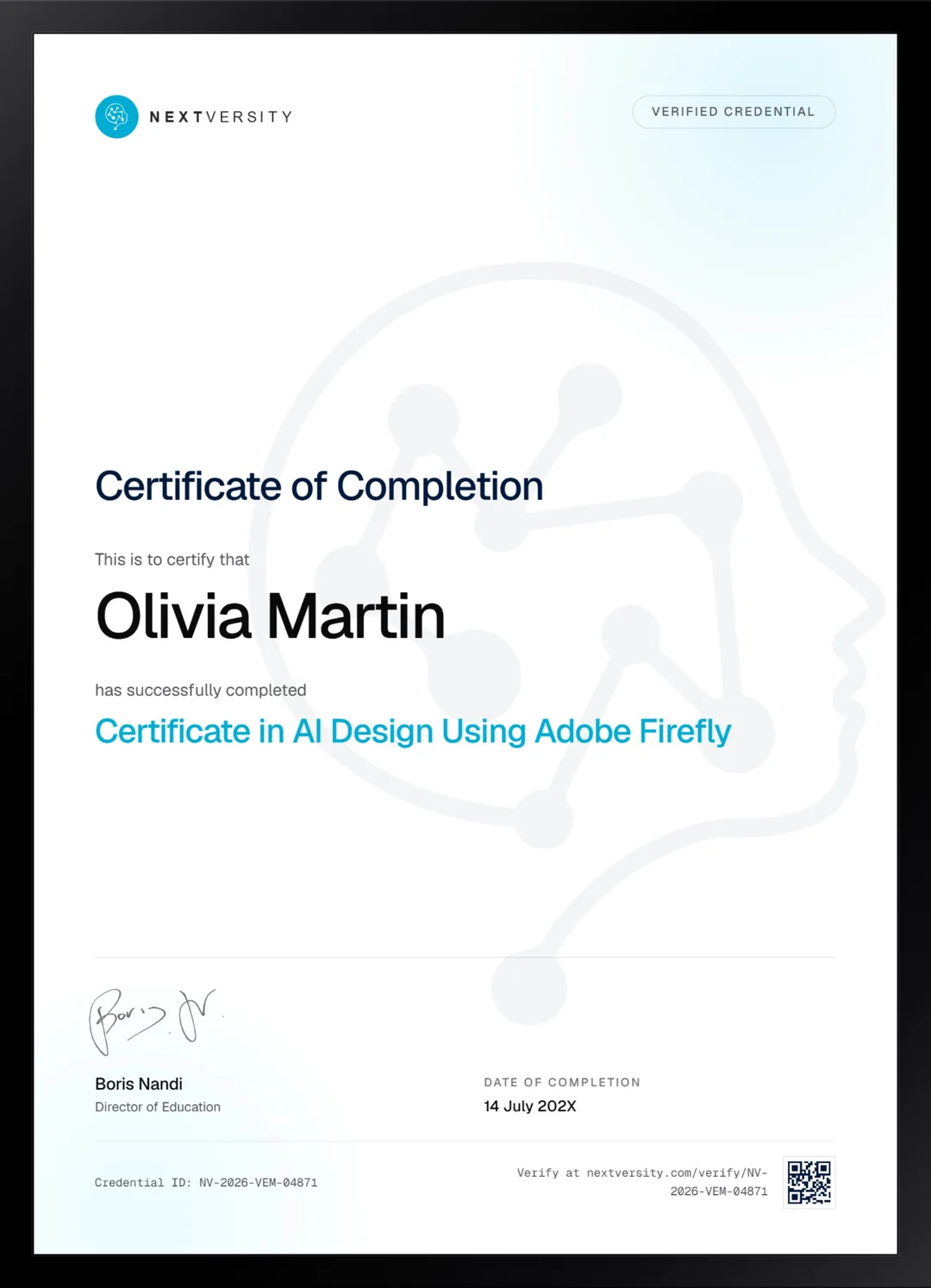
Finish the final module and your AI Design Using Adobe Firefly certificate is issued automatically. Download it, share it with employers and clients, or add it to your resume and LinkedIn.
Where this can take you
Skills from this school show up in roles like these. The certificate proves you finished; the projects you build are what get you hired.
- AI content specialist
- Prompt engineer
- Marketing automation specialist
- AI workflow consultant
Enroll with confidence
Enroll with confidence
Full details in the refund policy. One subscription covers this course and every other course in all 8 schools.
Pair it with
More from the AI & Automation school
 Certificate
Prompt anatomy, parameters, reference images and the edit tab, then three projects taken from moodboard to export.
51 lessonsSelf-pacedCertificate
 Certificate
Inpainting, outpainting, image guidance and upscalers, then a model you train yourself and artwork built to print.
29 lessonsSelf-pacedCertificate
FAQ
Common questions about the Adobe Firefly course
Do I need Photoshop and Illustrator for the Adobe Firefly course?
For half of it, yes. The mockup module works in Photoshop and the vector module works in Illustrator, and neither has a free tier, though Adobe offers trials. Express does have a usable free tier. Without the two paid applications, those modules become demonstrations you watch rather than projects you build.
Is Adobe Firefly free to use?
Generating spends credits, and the video features spend more and are billed separately from an Adobe subscription. The course states that plainly rather than leaving you to discover it, and this page repeats it, because the cost structure is the thing most likely to surprise you partway through.
Does the course cover generative fill?
Yes, twice over. It gets its own lesson in the foundations module for inserting, removing and repairing parts of an image, and then returns inside Photoshop during the product mockup build, which is where it earns its keep. Generative fill is the single most useful feature here for people doing commercial design work.
Can I use Adobe Firefly work commercially?
One lesson in the course makes a claim about that for generated video, and this page will not repeat it as fact. The claim belongs to the instructor rather than to us, and the terms attached to generated content change. Check Adobe’s current licensing yourself before you put generated material into anything you sell.
Does the Adobe Firefly course cover AI video?
The last module does, end to end: developing a concept, writing a prompt with subject, action and environment, generating clips, editing scenes, adding sound and effects, then assembling a finished piece. Holding a consistent look across separate clips is the hard part, and that gets proper attention rather than a single tip.
How long does the Adobe Firefly course take?
Roughly 27 to 37 hours including the four class projects, which is a wide range because it depends how far you take each build. One module a week is realistic alongside a job. It is self-paced with no deadlines, and the mockup module is the one worth slowing down for.
How does the Adobe Firefly certificate work?
Finish every lesson and the module quizzes, and a twenty-question final exam opens at a 75% pass mark. Passing issues a certificate automatically, with a verification code and a public link anyone can check. The four class projects are what you show a client, and the certificate confirms you completed the course.
Free info pack
Not ready to enroll? Start with the guide.
The full curriculum for this course, what you'll build, and how it fits with the rest of the school, in one short guide.