
AI & Automation school
Certificate in AI Image Generation Using Leonardo AI
Half of this course happens after the first image appears.
The Leonardo AI course for people who want to finish an image rather than only generate one: canvas editing, image guidance and upscalers, then a model you train yourself.
Overview
What this Leonardo AI course covers
Picture quality across the major generators is roughly comparable now, and what sets this tool apart is what you can do to an image without leaving the app. So this Leonardo AI course spends most of its length exactly there, on the editing that turns a promising generation into a finished piece.
Inpainting a region, outpainting past the original edge and blending two images all get covered properly rather than demonstrated once, alongside image guidance, upscalers and assembling one picture from several generations. Model training comes next, with a warning worth repeating: trained models are public by default. Then generations become logos, shirts and stickers designed for a cut or a print rather than made to fit afterward.
Outcomes
What you will be able to do
Requirements
Course requirements
- A Leonardo AI account. The free tier is the right place to start and its token allowance refills on a schedule.
- A paid plan only if you get as far as model training. That module is the one part that needs it.
- No drawing or design background. Everything is taught from the first generation onward.
- A decision made in advance: trained models are public by default, so choose your training subject accordingly.
Syllabus
AI Image Generation Using Leonardo AI curriculum
28 recorded video lessons you follow along in the software, at your own pace. Quizzes through each module check what stuck, and a 20-question final exam earns your certificate.
1Course Introduction1 lesson
- Welcome (reading)
2Leonardo AI Foundations and Image Generation Basics3 lessons · 3 videos · quiz
- Introduction to Leonardo AI (video lesson, 3 minutes 21 seconds)
- Understanding AI Image Ethics (video lesson, 3 minutes 2 seconds)
- Understanding Leonardo AI Plans and Account Setup (video lesson, 6 minutes 38 seconds)Quiz
3Leonardo AI Tools and Image Generation Workflow5 lessons · 5 videos · quiz
- Generating Images with Leonardo AI (video lesson, 16 minutes 27 seconds)
- Using Realtime Canvas (video lesson, 12 minutes 36 seconds)
- Generating and Upscaling Images (video lesson, 12 minutes 57 seconds)
- Using Universal Upscaler and Motion Tools (video lesson, 10 minutes 29 seconds)
- Using Realtime Generation (video lesson, 14 minutes 39 seconds)Quiz
4Advanced Leonardo AI Generation Techniques11 lessons · 11 videos · quiz
- Generating Images with Supporting AI Tools Part 1 (video lesson, 15 minutes 16 seconds)
- Generating Images with Supporting AI Tools Part 2 (video lesson, 5 minutes 17 seconds)
- Creating Complex Images Part 1 (video lesson, 9 minutes 45 seconds)
- Creating Complex Images Part 2 (video lesson, 16 minutes 57 seconds)
- Advanced Canvas Editor Techniques Part 1 (video lesson, 10 minutes 42 seconds)
- Advanced Canvas Editor Techniques Part 2 (video lesson, 14 minutes 17 seconds)
- Advanced Canvas Editor Techniques Part 3 (video lesson, 10 minutes 23 seconds)
- Advanced Canvas Editor Techniques Part 4 (video lesson, 8 minutes 8 seconds)
- Experimenting with Different Image Styles (video lesson, 15 minutes 18 seconds)
- Advanced Image Guidance Techniques (video lesson, 16 minutes 56 seconds)
- Advanced Live Canvas Techniques (video lesson, 13 minutes 44 seconds)Quiz
5Custom AI Model Training in Leonardo3 lessons · 3 videos · quiz
- Getting Started with AI Model Training (video lesson, 15 minutes 52 seconds)
- AI Model Training Examples Part 1 (video lesson, 15 minutes 22 seconds)
- AI Model Training Examples Part 2 (video lesson, 14 minutes 57 seconds)Quiz
6AI Graphics, Merchandise and Digital Product Design3 lessons · 3 videos · quiz
- Creating Logos with Leonardo AI (video lesson, 13 minutes 23 seconds)
- Creating T-Shirts, Stickers and Wallpapers (video lesson, 14 minutes 23 seconds)
- Selling AI Artwork Online (video lesson, 5 minutes 7 seconds)Quiz
7Leonardo AI Feature Updates and Advanced Tools2 lessons · 2 videos · quiz
- Leonardo AI Version 1.4 Feature Overview (video lesson, 11 minutes 11 seconds)
- Generating Images with Photoreal and Alchemy V2 (video lesson, 14 minutes 21 seconds)Quiz
8Course Conclusion and Next Steps1 lesson · 1 video
- Course Summary and Key Takeaways (video lesson, 42 seconds)
Certificate
Earn a certificate you can show
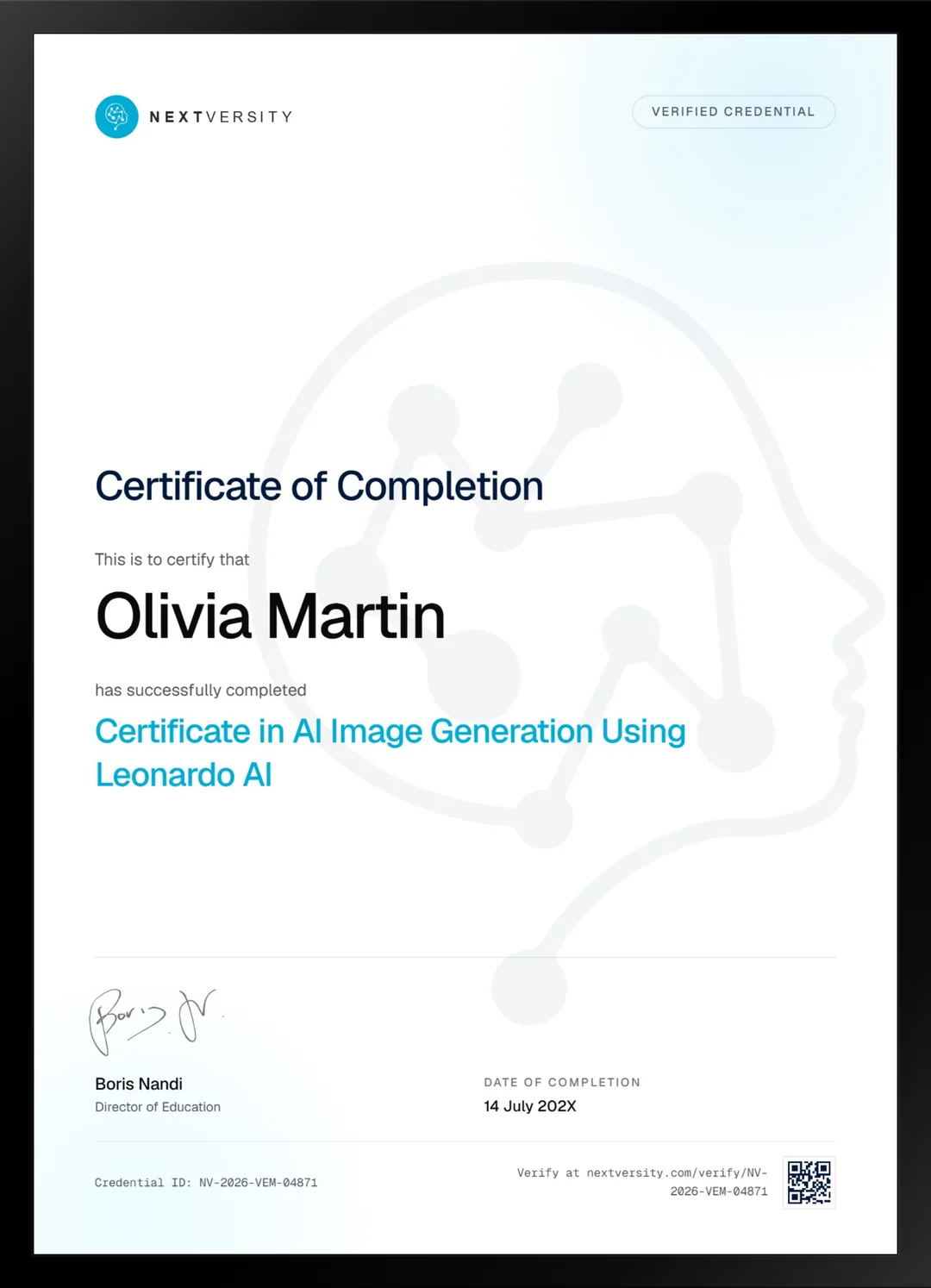
Finish the final module and your AI Image Generation Using Leonardo AI certificate is issued automatically. Download it, share it with employers and clients, or add it to your resume and LinkedIn.
Where this can take you
Skills from this school show up in roles like these. The certificate proves you finished; the projects you build are what get you hired.
- AI content specialist
- Prompt engineer
- Marketing automation specialist
- AI workflow consultant
Enroll with confidence
Enroll with confidence
Full details in the refund policy. One subscription covers this course and every other course in all 8 schools.
Pair it with
More from the AI & Automation school
 Certificate
Prompt anatomy, parameters, reference images and the edit tab, then three projects taken from moodboard to export.
51 lessonsSelf-pacedCertificate
 Certificate
Generative fill and expand, then product mockups in Photoshop, logos in Illustrator and social sets in Express.
37 lessonsSelf-pacedCertificate
FAQ
Common questions about the Leonardo AI course
Is Leonardo AI free to use?
There is a genuine free tier, and the course recommends starting there rather than pushing you toward a plan. It carries a token allowance that refills on a schedule, and both generating and live canvas work on it. Only the model training module needs a paid plan, and that comes late in the course.
Can I train my own AI model in Leonardo AI?
Yes, and three lessons cover it: what makes a dataset worth training on, then worked examples on a subject and on a look. Two warnings come with it. Training needs a paid plan, and trained models are public by default, which matters a great deal if your dataset is photographs of a real person.
What does the course teach in the canvas editor?
Four consecutive lessons, plus live canvas and realtime canvas elsewhere. Inpainting a region, outpainting past the original edge, and blending two images by prompting the content between them. This is the part that makes the tool worth learning, because it means a near-miss becomes a finished image instead of a discarded one.
Should I learn Leonardo AI or Midjourney?
Pick by what you do after the picture appears. Leonardo if you want to keep working on it in the same app, train a model, and start without paying. Midjourney if the strength of a single generation and the breadth of styles matter most and you are willing to pay from day one. Both are in one subscription.
How long does the Leonardo AI course take to finish?
Roughly 18 to 25 hours if you generate alongside the videos, and the time is unevenly spread. The advanced module is considerably longer than its lesson count suggests, because each technique is worth practicing rather than watching. It is self-paced with no deadlines, so a module a week is comfortable.
Can I sell artwork I make with Leonardo AI?
One module covers what selling generated artwork online involves, alongside making logos, shirts, stickers and wallpapers designed properly for their format. It does not claim what that artwork earns, because nobody honestly knows. It does cover publishing generated work honestly and what stock platforms ask you to declare, which is the part that protects you.
Is a certificate included with the Leonardo AI course?
Yes, and it comes with the subscription rather than as an extra purchase. Work through every lesson and quiz and a twenty-question final exam opens at a 75% pass mark. Passing issues a certificate with a verification code and a public link. The artwork you produce along the way is the portfolio half.
Free info pack
Not ready to enroll? Start with the guide.
The full curriculum for this course, what you'll build, and how it fits with the rest of the school, in one short guide.